https://www.youtube.com/@liliumbosniacumcode/videos
Lilium Code
Trying to share my knowledge as best as I can. All code is available on github https://github.com/liliumbosniacum
www.youtube.com
- 이분이 올리신 강의를 따라하면서 받아적은 노트들이다!
elasticache를 사용하기 위해 일단 docker compose를 만들었다:
version: '3.7'

services:
  elasticsearch:
    image: docker.elastic.co/elasticsearch/elasticsearch:7.17.10
    container_name: elasticsearch
    environment:
      - node.name=elasticsearch
      - discovery.type=single-node
      - cluster.name=docker-cluster
      - bootstrap.memory_lock=true
      - "ES_JAVA_OPTS=-Xms512m -Xmx512m"
      # 보안 설정 (비밀번호 설정하고 싶으면 true, 귀찮으면 false)
      # 공부용/로컬용은 보통 끄고 하거나, 켜더라도 간단하게 설정
      - xpack.security.enabled=false
    ports:
      - "9200:9200"
    ulimits:
      memlock:
        soft: -1
        hard: -1
    volumes:
      - es_data:/usr/share/elasticsearch/data

# http://localhost:5601
  kibana:
    image: docker.elastic.co/kibana/kibana:7.17.10
    container_name: kibana
    environment:
      - ELASTICSEARCH_HOSTS=http://elasticsearch:9200
    ports:
      - "5601:5601"
    depends_on:
      - elasticsearch

volumes:
  es_data:
    driver: local
RegisterConfig:
@Configuration
@EnableElasticsearchRepositories(basePackages = "personal.estoyproject.repository")
public class RegisterConfig extends ElasticsearchConfiguration {

  @Value("${register.elasticsearch.user}")
  private String username;

  @Value("${register.elasticsearch.password}")
  private String password;

  /*
  where u put all things u need to connect to elastisearch
  - includes address, port, authorization, etc
  - use builder for client config
   */
  @Override
  public ClientConfiguration clientConfiguration() {

      return ClientConfiguration.builder()
          .connectedToLocalhost() // in production use smth else
          .build();
  }
}
그리고 이런 식으로 간단하게 Person이라는 Document와 인덱스를 설정할 수 있다:
@Document(indexName = "person")
@Getter
@Setter
public class PersonDocument {
  private String id;
  private String name;
}
그리고 이어서 간단하게 PersonDocument를 저장하는 컨트롤러, 서비스, 리포지토리를 만들어줬다.
/*
  Controller
*/
@RestController
@RequiredArgsConstructor
@RequestMapping("/api/person")
public class PersonController {

  private final PersonService personService;

  @PostMapping
  public void save(@RequestBody final PersonDto personDto) {
    personService.save(personDto);
  }
}

/*
  Service
*/
@Service
@RequiredArgsConstructor
public class PersonService {

  private final PersonRepository personRepository;
  private final PersonMapper personMapper;

  public void save(final PersonDto dto) {
    final PersonDocument document = personMapper.convertToDocument(dto);
    if (document == null) return;
    personRepository.save(document);
  }
}


/*
  Repository
*/
public interface PersonRepository extends ElasticsearchRepository<PersonDocument, String> {
}
이제 docker compose up 명령 + 어플리케이션을 실행을 하고 http://localhost:5601 (키바나) -> console에 들어갔다.

여기에서 GET _cat/indeces를 하면 아직 INSERT해서 document를 넣지 않았는데도 person index가 존재하는 것을 볼 수 있다.
- person만 Yellow다
- Green - 모든 데이터(primary)와 복제본 (replica)이 안전하게 저장됨
- Yellow - 데이터는 있는데 복제본을 저장할 곳이 없다
- person 만 Yellow인 이유: ES는 기본적으로 인덱스를 만들 때 백업본을 1개 만든다. 하지만 현재 토이 프로젝트에서는 docker compose로 노드 1대만 띄우고 있는데, ES의 원칙상 원본과 복제본은 절대 같은 노드에 두지 않는다. 그래서 원본은 저장했는데 복제본을 저장할 다른 노드가 없어서 yellow 상태로 대기중인 것이다.
- Red - 데이터 유실
Postman으로 PersonDto를 테스트로 생성해봤다:
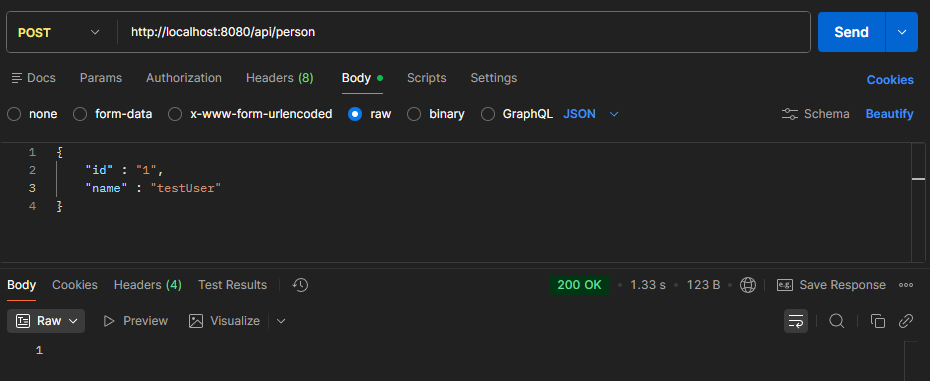

저렇게 데이터가 들어온 것을 볼 수 있다.
하지만 @Document를 사용하는건 명확한 한계가 있다. 이건 자동 방식 (automatic)쪽에 속한다.
- tokenizer, filter, analyzer (분석기) 설정을 정교하게 넣기가 어렵다.
- 수동 방식 (client를 사용)은 settings.json 파일을 따로 만들어서 분석기 설정을 우너하는 만큼 복잡하게 넣을 수 있다.
- 운영 안정성도 있다
- 만약 팀원 A가 실수로 @Document 설정을 바꾸고 배포했다가, 기존 데이터 매핑이 꼬여버리면 그냥 대형 사고가 일어나는 것이다.
- 그래서 실무에는 인덱스 생성은 배포 전에 관리자가 따로 (kibana나 script로) 하고, 스프링 앱은 이미 만들어진 인덱스를 쓰기만 하는 원칙을 많이 따른다.
새로 만든 IndexService
@Slf4j
@Service
@RequiredArgsConstructor
public class IndexService {

  private final ElasticsearchClient client;

  public void createIndices() {
    List<IndexInfo> indexInfos = getIndexInformation();

    if (CollectionUtils.isEmpty(indexInfos)) { // exception or no docs
      return;
    }

    for (IndexInfo indexInfo : indexInfos) {
        deleteIndex(indexInfo);
        createIndex(indexInfo);
      }
  }


  // ======================

  private void deleteIndex(IndexInfo indexInfo) {
    try {
      BooleanResponse exists = client.indices().exists(e -> e.index(indexInfo.indexName()));
      if (!exists.value()) {
        return;
      }

      client.indices().delete(d -> d.index(indexInfo.indexName()));
    } catch (Exception e) {
      log.error("{}", e.getMessage(), e);
    }
  }

  private void createIndex(IndexInfo indexInfo) {
    try {
      // can add mapping here
      client.indices().create(c -> c.index(indexInfo.indexName()));
    } catch (Exception e) {
      log.error("{}", e.getMessage(), e);
    }
  }
  private List<IndexInfo> getIndexInformation()  {
    final var scanner = new ClassPathScanningCandidateComponentProvider(false);

    // ======== include filter ========
    // class of annotation we want to scan
    scanner.addIncludeFilter(new AnnotationTypeFilter(Document.class));

    // tells where to scan
    final Set<BeanDefinition> beanDefinitionSet = scanner.findCandidateComponents("personal.estoyproject");

    // iterate over bean definitions
    // - extract info from bean def, like index name
    return beanDefinitionSet.stream()
        .map(IndexService::getIndexName)
        .filter(Objects::nonNull)
        .map(IndexInfo::new)
        .toList();
  }


  private static String getIndexName(BeanDefinition definition)  {
    try {
      final Class<?> documentClass = Class.forName(definition.getBeanClassName());
      Document annotation = documentClass.getAnnotation(Document.class);
      return annotation.indexName();
    } catch (ClassNotFoundException e) {
      log.error("{}", e.getMessage(), e);
      return null;
    }
  }
}
강의를 따라하면서 IndexSerivice를 구현하게 되었다. 메인 함수는 createIndices()다:
- 먼서 @Document라고 붙은 class를 다 찾아내서 List<IndexInfo> 형태로 받아온다
- 그 리스트를 순회하면서, 이미 같은 이름의 인덱스가 있으면 삭제하고 새로 만든다.
짧은 IndexController
@RestController
@RequestMapping("/api/index")
@RequiredArgsConstructor
public class IndexController {

  private final IndexService indexService;

  @PostMapping
  public void create() {
    indexService.createIndices();
  }

}
어플리케이션 실행 -> Delete person (키바나) -> 포스트맨으로 POST http://localhost:8080/api/index를 부름 -> 키바나에서 GET _cat/indices을 실행할때 person이 보인다

이렇게 하는 이유는 깨끗한 상태 보장 -> 테스트 데이터를 다시 초기화 하고 싶을때 유용한 것 같다. (중간에 Document 설정이 바뀌었을 수도 있고, 스키마 변경이 까다로워서 그냥 밀고 다시 만드는게 편함).
하지만 운영 환경에서는 절대 이렇게 쓰지 않는다.
이제 매핑을 추가해보자:
PersonDocument
@Document(indexName = "person")
@Getter
@Setter
@Mapping(mappingPath = "static/person.json")
// if we use repos to create documents, this is enough
// but if we're using indexservice (like creating our own)
public class PersonDocument {
  private String id;
  private String name;
}- 이제 @Document를 단 모든 클래스를 뒤질 때 @Mapping이 static/person.json이라고 되어있는 걸 인식한다.
- 이제 person이라는 index를 만들때 person.json파일을 사용한다
IndexInfo
public record IndexInfo(
    String indexName,
    String mappingPath
) {

}
/static/person.json
{
  "properties": {
    "id": {
      "type" : "keyword"
    },
    "name" : {
      "type" : "text"
    }
  }
}
수정된 IndexService
@Slf4j
@Service
@RequiredArgsConstructor
public class IndexService {

  private final ElasticsearchClient client;
  private final ResourceLoader resourceLoader;

  public void createIndices() {
    List<IndexInfo> indexInfos = getIndexInformation();

    if (CollectionUtils.isEmpty(indexInfos)) { // exception or no docs
      return;
    }

    for (IndexInfo indexInfo : indexInfos) {
        deleteIndex(indexInfo);
        createIndex(indexInfo);
      }
  }


  // ======================

  private void deleteIndex(IndexInfo indexInfo) {
    try {
      BooleanResponse exists = client.indices().exists(e -> e.index(indexInfo.indexName()));
      if (!exists.value()) {
        return;
      }

      client.indices().delete(d -> d.index(indexInfo.indexName()));
    } catch (Exception e) {
      log.error("{}", e.getMessage(), e);
    }
  }

  private void createIndex(IndexInfo indexInfo) {
    try {
      // can add mapping here
      client.indices()
          .create(c -> c.index(indexInfo.indexName())
            .mappings(t -> t.withJson(getMappings(indexInfo.mappingPath())))
          );
    } catch (Exception e) {
      log.error("{}", e.getMessage(), e);
    }
  }

  private List<IndexInfo> getIndexInformation()  {
    final var scanner = new ClassPathScanningCandidateComponentProvider(false);

    // ======== include filter ========
    // class of annotation we want to scan
    scanner.addIncludeFilter(new AnnotationTypeFilter(Document.class));

    // tells where to scan
    final Set<BeanDefinition> beanDefinitionSet = scanner.findCandidateComponents("personal.estoyproject");

    // iterate over bean definitions
    // - extract info from bean def, like index name
    return beanDefinitionSet.stream()
        .map(IndexService::getIndexInfo)
        .filter(Objects::nonNull)
        .toList();
  }


  private static IndexInfo getIndexInfo(BeanDefinition definition)  {
    try {
      final Class<?> documentClass = Class.forName(definition.getBeanClassName());
      Document document = documentClass.getAnnotation(Document.class);
      Mapping mapping= documentClass.getAnnotation(Mapping.class);
      return new IndexInfo(
          document.indexName(),
          mapping.mappingPath()
      );
    } catch (ClassNotFoundException e) {
      log.error("{}", e.getMessage(), e);
      return null;
    }
  }

  private InputStream getMappings(final String mappingPath) {
    Resource resource = resourceLoader.getResource("classpath:" + mappingPath);
    try {
      return resource.getInputStream();
    } catch (IOException e) {
      log.error("{}", e.getMessage(), e);
      return null;
    }
  }
}
이제 키바나로 가서 GET person/_mappings를 해주면 아까 static/person.json 파일이 나온다:

'Codeit > 프로젝트' 카테고리의 다른 글
| [모두의 플리] ES 성능 테스트! (0) | 2025.12.09 |
|---|---|
| [모두의 플리] 트러블슈팅 - 실시간 시청 세션 동기화와 Race condition (0) | 2025.12.02 |
| [모두의 플리] 고도화 - redis를 이용한 분산환경 고려 (pub/sub) (0) | 2025.11.26 |
| [모두의 플리] 트러블 슈팅 - 웹소켓 환경에서 유저 정보 가져오기 (0) | 2025.11.26 |
| [모두의 플리] 트러블슈팅 - @AuthenticationPrincipal을 가진 컨트롤러 테스트 (0) | 2025.11.19 |