Controller
sprint5과제는 컨트롤러 구현을 주어진 API 스펙에 맞추고 Swagger을 붙혀 Swagger UI + Postman에 테스트하는 것이다
6개의 entity에 맞춰서 6개의 컨트롤러다:
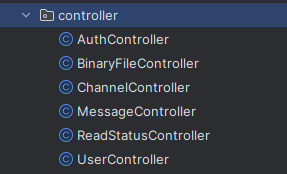
Controller 예시 - BinaryFileController
일단 그냥 메서드 2개가 있는 간단한 컨트롤러를 가져왔다:
@RestController
@RequestMapping("/api/binaryContents")
@RequiredArgsConstructor
@Tag(name = "BinaryContent", description = "Binary Content 관련 API")
public class BinaryFileController {

  private final BinaryContentService binaryContentService;

  // ============================== GET - 첨부 파일 조회 ==============================
  @Operation(summary = "첨부 파일 조회", operationId = "find")
  @ApiResponses(value = {
      @ApiResponse(responseCode = "200", description = "첨부 파일 조회 성공",
          content = @Content(mediaType = "*/*",
              schema = @Schema(implementation = BinaryContentResponse.class))
      ),
      @ApiResponse(responseCode = "404", description = "첨부 파일을 찾을 수 없음",
          content = @Content(mediaType = "*/*",
              examples = @ExampleObject(value = "BinaryContent with id {binaryContentId} not found"))
      )
  })
  @GetMapping("/{binaryContentId}")
  public ResponseEntity<BinaryContentResponse> getBinaryContent(
      @Parameter(description = "조회할 첨부 파일 ID")
      @PathVariable("binaryContentId") UUID binaryContentId) {
    BinaryContentResponse binaryContent = binaryContentService.find(binaryContentId);
    return ResponseEntity.ok(binaryContent);
  }

  // ============================== GET - 여러 첨부 파일 조회 ==============================
  @Operation(summary = "여러 첨부 파일 조회", operationId = "findAllByIdIn")
  @ApiResponses(value = {
      @ApiResponse(responseCode = "200", description = "첨부 파일 목록 조회 성공",
          content = @Content(mediaType = "*/*",
              array = @ArraySchema(schema = @Schema(implementation = BinaryContentResponse.class)))
      )
  })
  @GetMapping
  public ResponseEntity<List<BinaryContentResponse>> getBinaryContents(
      @Parameter(description = "조회할 첨부 파일 ID 목록")
      @RequestParam("binaryContentIds") List<UUID> binaryContentUUIDList
  ) {
    List<BinaryContentResponse> binaryContentResponses = binaryContentService.findAllByIdIn(
        binaryContentUUIDList);
    return ResponseEntity.ok(binaryContentResponses);
  }
}
첨부 파일 조회
일단 첫번째 GET을 보자:
  // ============================== GET - 첨부 파일 조회 ==============================

@Operation(summary = "첨부 파일 조회", operationId = "find")
  @ApiResponses(value = {
      @ApiResponse(responseCode = "200", description = "첨부 파일 조회 성공",
          content = @Content(mediaType = "*/*",
              schema = @Schema(implementation = BinaryContentResponse.class))
      ),
      @ApiResponse(responseCode = "404", description = "첨부 파일을 찾을 수 없음",
          content = @Content(mediaType = "*/*",
              examples = @ExampleObject(value = "BinaryContent with id {binaryContentId} not found"))
      )
  })
  @GetMapping("/{binaryContentId}")
  public ResponseEntity<BinaryContentResponse> getBinaryContent(
      @Parameter(description = "조회할 첨부 파일 ID")
      @PathVariable("binaryContentId") UUID binaryContentId) {
    BinaryContentResponse binaryContent = binaryContentService.find(binaryContentId);
    return ResponseEntity.ok(binaryContent);
  }
- @Operation
- 깃허브: The annotation may be used to define a resource method as an OpenAPI Operation, and/or to define additional properties for the Operation.
- summary, description 사용 가능
- @ApiResponses
- @Operation에서도 사용 가능하다
- API가 돌려주는 응답을 설명한다.
- @Content
- @Parameter, RequestBody, ApiResponse 어노테이션의 필드로 정의된다
- 파라미터, 요청 또는 응답의 콘텐츠/미디어 타입을 정의하는 데 사용될 수 있다
- 여기서 더 찾아볼 수 있다: https://docs.swagger.io/swagger-core/v2.2.34/apidocs/io/swagger/v3/oas/annotations/media/Content.html
- 여기 안에 @ExampleObject도 있다는 것을 볼 수 있다
@ApiResponse(
    content = @Content(mediaType = "application/json",
schema = @Schema(implementation = Pet.class)))- @Schema
- @Parameter, @Header, @Content 어노테이션의 schema 필드에 넣을 수 있다
@ApiResponse(description = "Pets matching criteria",
                           content = @Content(schema = @Schema(implementation = Pet.class))
                   ),
여러 첨부 파일 조회
  // ============================== GET - 여러 첨부 파일 조회 ==============================
  @Operation(summary = "여러 첨부 파일 조회", operationId = "findAllByIdIn")
  @ApiResponses(value = {
      @ApiResponse(responseCode = "200", description = "첨부 파일 목록 조회 성공",
          content = @Content(mediaType = "*/*",
              array = @ArraySchema(schema = @Schema(implementation = BinaryContentResponse.class)))
      )
  })
  @GetMapping
  public ResponseEntity<List<BinaryContentResponse>> getBinaryContents(
      @Parameter(description = "조회할 첨부 파일 ID 목록")
      @RequestParam("binaryContentIds") List<UUID> binaryContentUUIDList
  ) {
    List<BinaryContentResponse> binaryContentResponses = binaryContentService.findAllByIdIn(
        binaryContentUUIDList);
    return ResponseEntity.ok(binaryContentResponses);
}- @ArraySchema
- 파라미터, 모델 속성, 요청/응답 본문 등이 배열 형태일 때, 해당 배열의 구조와 속성을 정의
- applicable to parameters, schema classes (aka "models"), properties of such models, request and response content, header
- @Schema 어노테이션과 함께 사용할 수 없다
- 파라미터, 모델 속성, 요청/응답 본문 등이 배열 형태일 때, 해당 배열의 구조와 속성을 정의
공식 documentation을 최대한 의지하려고 했는데 초반엔 구글링을 해도 잘 안나와서 조금 당황했었다;;
- https://github.com/swagger-api/swagger-core/wiki/Swagger-2.X---Annotations
- 처음부터 이걸 볼껄 그랬다 ㅠㅠ 왠지 모르게 바로 안나오고 그냥 블로그 글들만 잔뜩 나와서 조금 헤맸다;; (다시 잃어버릴까봐 박제)

공식 문서를 잘 찾는 것도 능력이다..
공식문서만 좀 일찍 찾았으면 훨씬 더 덜 해매었다는 생각만 든다..ㅎㅎ
'Codeit > 스프린트 과제' 카테고리의 다른 글
| [sprint8] S3 관련 코드 + S3Client와 Presigned Url (3) | 2025.08.25 |
|---|---|
| [sprint8] 어플리케이션 컨테이너화 - dockerfile, docker compose, docker volume (1) | 2025.08.22 |
| [sprint4] IOException과 @Transactional (멘토님 피드백) (0) | 2025.07.14 |
| [sprint3] 심화 2 - application.yaml로 Bean 구현하기 (File*Repository 구현체의 파일 저장 경로 설정하기 (2) | 2025.06.28 |
| [sprint3] 심화 1 - application.yaml로 Repository 구현체 선택하기 (File/JCF) (2) | 2025.06.27 |